








The best Microsoft Clarity alternatives & competitors, compared


Contents
Microsoft Clarity is hard to beat on price – it's completely free with no traffic limits, session caps, or paid tiers. It offers heatmaps, session recordings, rage click detection, and an AI-powered Copilot that generates session takeaways. It also supports web, Android, iOS, React Native, and Flutter.
It's worth noting that Clarity is free because Microsoft uses the anonymized behavioral data it collects to improve its own machine learning models – that's the trade-off. You'll also need another tool if you want more than basic behavior analysis, deeper debugging tools, mobile analytics, or a full product development platform.
This guide compares the best Microsoft Clarity alternatives: what they do better, where they fall short, and who they're actually for.
1. PostHog
- Founded: 2020
- Similar to: LogRocket, Mixpanel
- Typical users: Engineers and product teams
- Typical customers: Mid-size B2B/B2C companies and startups
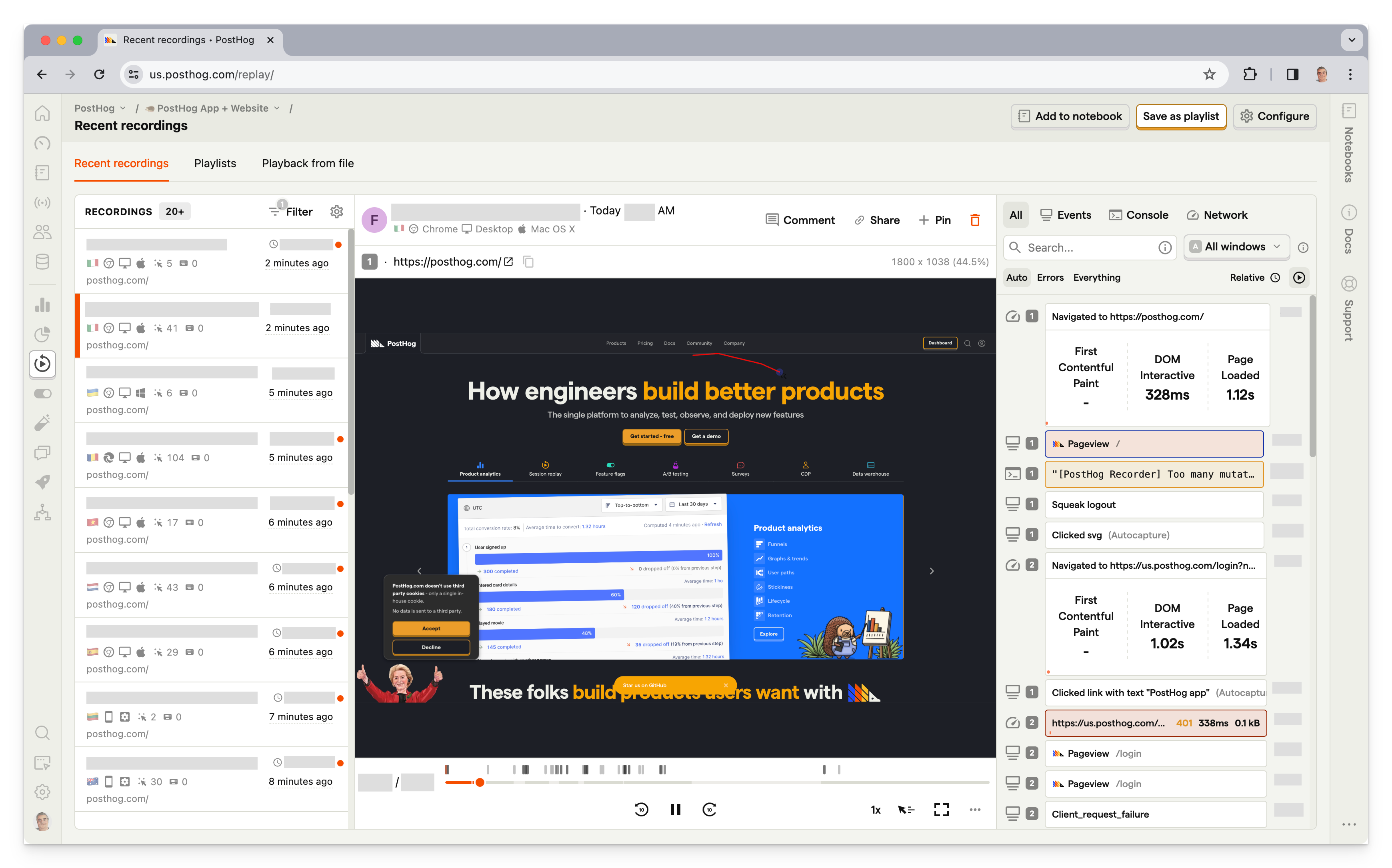
What is PostHog?
PostHog (that's us 👋) is a developer platform that combines session replay, product analytics, feature flags, experiments, error tracking, logs, user surveys, and more into one product.
This means it's not just an alternative to Microsoft Clarity, but also tools like Statsig, LogRocket, Sentry, and Mixpanel.
Typical PostHog users are engineers and product managers at startups and mid-size companies, such as ElevenLabs, Supabase, and Lovable.
Key features
- Session replays: Including event timelines, console logs, network activity.
- Heatmaps: Visualize user and rage clicks anywhere on your site.
- Product analytics: Analyze funnels, user paths, retention, trends, create user cohorts.
- Feature flags & A/B testing: Rollout features safely, run multivariate A/B tests.
- Surveys: Run customer satisfaction, NPS, and PMF surveys.
- Error tracking: Capture exceptions linked directly to session replays and user context.
How does PostHog compare to Microsoft Clarity?
PostHog goes significantly further than Clarity – it adds product analytics, feature flags, A/B testing, error tracking, surveys, and more.
On session replay specifically, PostHog includes console logs, network monitoring, and performance metrics that Clarity lacks.
PostHog isn't totally free like Clarity, but has a generous free plan: all users get 5,000 web replays, 2,500 mobile replays, and 1 million analytics events free every month.
Main differences between PostHog and Microsoft Clarity
- PostHog includes a built-in data warehouse; you can import data from Stripe, HubSpot, Postgres, Snowflake, and more, then query it with SQL alongside your product analytics and session data in one place. Clarity has no equivalent.
- PostHog supports group analytics for account-level analysis (useful for B2B SaaS). Clarity only tracks individual visitors.
- PostHog offers EU hosting. Clarity stores data in Microsoft's US-based Azure cloud; EU customers are covered by cross-border data transfer agreements (SCCs) but have no data residency option.
- PostHog is open source with a public roadmap. Clarity is a closed-source Microsoft product.
Main similarities between PostHog and Microsoft Clarity
- Both offer session replay with rage click and dead click detection.
- Both support heatmaps (click and scroll).
- Both have AI-powered insights, AI session summaries, and MCP servers.
- Both support web and mobile apps (Android, iOS, React Native, Flutter).
- Both are easy to set up – paste a snippet and data flows immediately.
Why do companies use PostHog?
According to reviews on G2, companies use PostHog because:
It replaces multiple tools: PostHog can replace Microsoft Clarity (session replay), Google Analytics, LaunchDarkly (feature flags and A/B testing), and Hotjar (feedback and surveys). This simplifies workflows and ensures all their data is in one place.
Pricing is transparent and scalable: Reviewers appreciate how PostHog's pricing scales as they grow. There's a generous free tier. Companies eligible for PostHog for Startups also get an additional $50k in credits.
They need a complete picture of users: PostHog includes every tool necessary to understand users and improve products. This means creating funnels to track conversion, watching replays to see where users get stuck, testing solutions with A/B tests, and gathering feedback with user surveys.
Bottom line
PostHog goes deeper than Clarity by making it easy to debug issues via detailed event timelines, console logs, and network monitoring, while also enabling you to understand user behavior at every level when combined with product analytics and its other tools.


Install PostHog with one command
Paste this into your terminal and make AI do all the work.

2. LogRocket
- Founded: 2016
- Similar to: PostHog, OpenReplay
- Typical users: Product managers, engineers, support teams
- Typical customers: B2B SaaS, B2C retail companies.
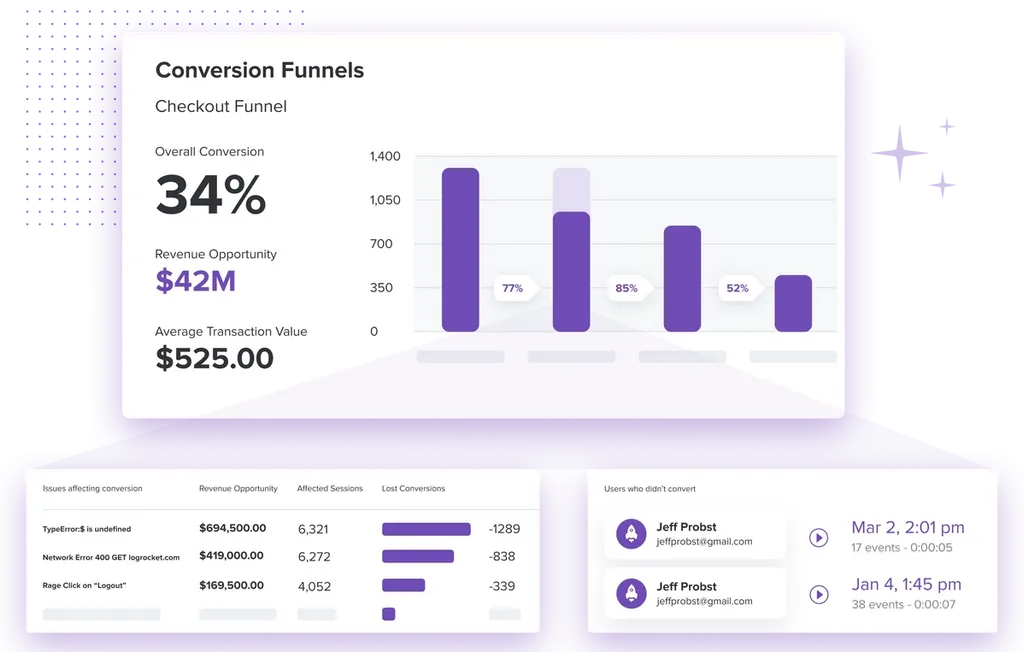
What is LogRocket?
LogRocket is a product experience platform with product analytics, error tracking, session replay, and performance monitoring. It focuses on helping product managers, engineers, and support teams identify and fix issues.
Key features
- Session replay: See what users do, debug product issues and performance
- Error tracking: Identify issues with JavaScript, network errors, and stack traces.
- Product analytics: Analyze conversion funnels, user paths, and retention.
- Performance monitoring: Monitor performance, CPU and memory usage, and network speed.
- Heatmaps: See what users are clicking on and how far they scroll.
- Galileo AI: Proactively surfaces user struggle patterns and UX issues.
How does LogRocket compare to Clarity?
LogRocket offers more features for engineers who want to investigate performance issues and bugs. It also adds some basic analytics features for analyzing conversion funnels and user paths. LogRocket's free plan includes 1,000 sessions per month.
Main differences between LogRocket and Microsoft Clarity
- LogRocket captures console logs, network requests, and JavaScript errors with stack traces – none of which Clarity provides.
- LogRocket's Galileo AI proactively surfaces struggle patterns; Clarity's Copilot generates per-session takeaways reactively.
- Clarity is completely free with no session limits. LogRocket's free tier covers 1,000 sessions/month; paid plans start at $69/month.
- Clarity has an AI-powered shopping assistant (currently in beta for Shopify) that uses Clarity's behavioral signals to guide shoppers and drive conversions. LogRocket has no equivalent.
Main similarities between LogRocket and Microsoft Clarity
- Both offer session replay with rage click detection.
- Both offer heatmaps (click, scroll).
- Both support conditional recording to capture only sessions that meet specific criteria.
- Both support web and mobile apps.
Why do companies use LogRocket?
Reviews on G2.com suggest companies use LogRocket because it:
Helps them identify problems: LogRocket's combination of error tracking, performance monitoring, and session replay makes it uniquely powerful at finding bugs and issues. Unlike other tools, it uncovers both user and software issues.
Improves user experience: LogRocket seems to succeed at their goal of helping fix issues. Reviewers find tools like session replay, error tracking, and rage clicks help them identify and improve UX problems and bugs.
Does everything they need: LogRocket provides a lot of functionality out of the box. It captures the details users need, provides useful visualizations, and automatically triages some issues.
Bottom line
LogRocket is an excellent Clarity alternative for companies that need more comprehensive bug tracking and error monitoring tools. Less technical users, such as marketers and designers, might find it overwhelming, but there's something here for everyone.
3. FullStory
- Founded: 2012
- Most similar to: PostHog, LogRocket
- Typical users: Product managers, customer success, and support
- Typical customers: Online retailers and SaaS companies
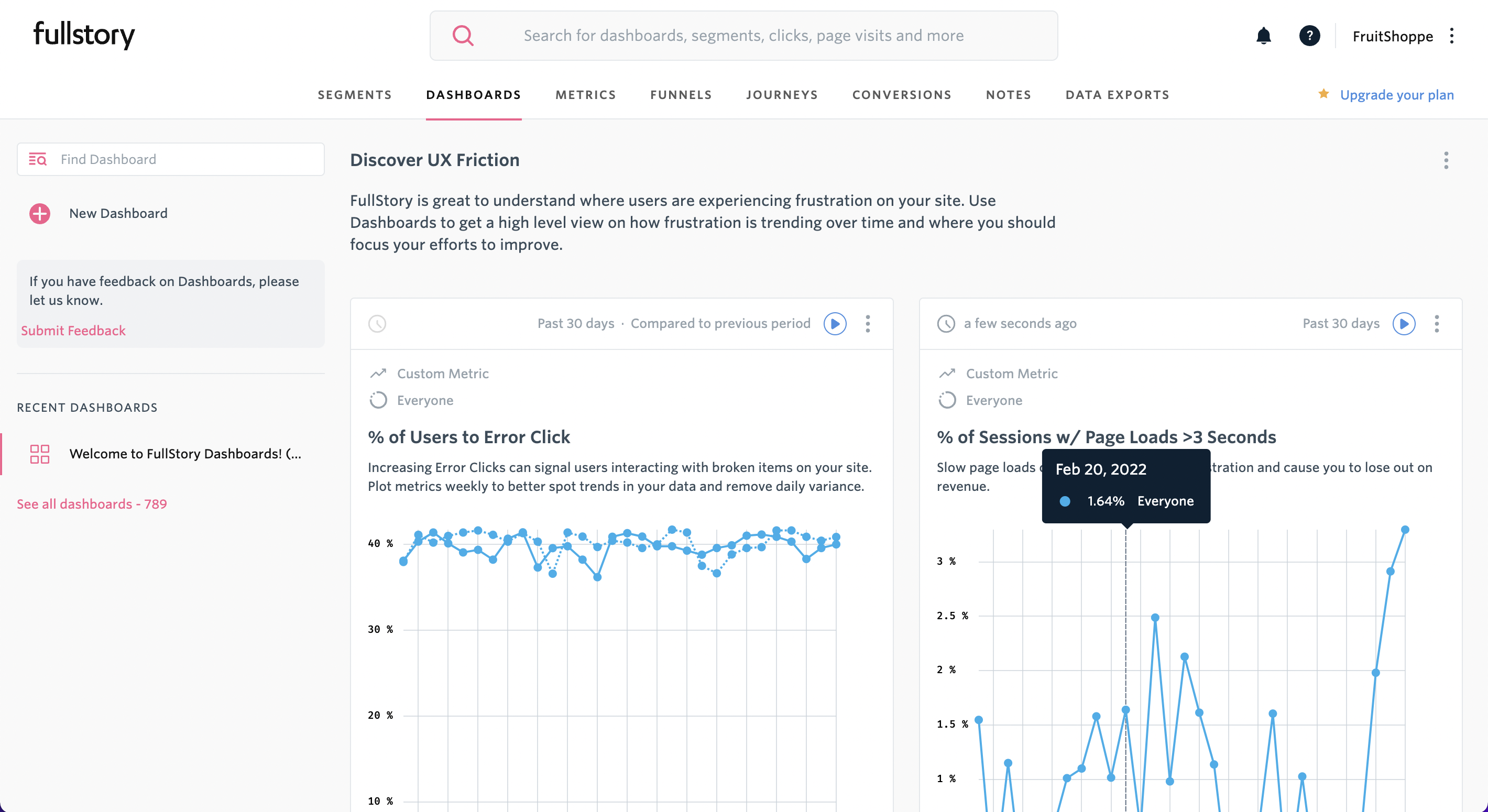
What is FullStory?
FullStory describes itself as Digital Experience Intelligence, which is code for session replay and mobile app analytics, with a side of product analytics. Like LogRocket and PostHog, it supports event autocapture, so you don't have to manually code every event you want to capture.
Key features
- Session replay: Watch and analyze real user sessions on web and mobile apps.
- Product analytics: Understand user paths and struggle points.
- DX Data: FullStory's proprietary behavioral data layer for retroactive querying.
- Heatmaps: Find out where users click and frustration points.
- Guides and Surveys: No-code in-app product tours, banners, and surveys.
- StoryAI: AI-powered session summaries and behavioral opportunity detection.
How does FullStory compare to Clarity?
FullStory is a more complex and mature product than Clarity, going way beyond basic session replay by offering everything companies need to understand behavior on websites and in apps. FullStory offers a basic free plan with a 30,000 sessions monthly limit.
Main differences between FullStory and Microsoft Clarity
- FullStory offers DX Data retroactive querying, StoryAI session summaries, Guides and Surveys, and more mature frustration signal detection. Clarity has AI Copilot for session insights but none of the broader tooling.
- FullStory Free includes 30,000 sessions/month with 12-month retention. Clarity has no session limits at all, ever.
- FullStory's paid plans are enterprise-only with opaque pricing. Clarity is free forever.
Main similarities between FullStory and Microsoft Clarity
- Both offer session replay with autocapture.
- Both detect frustration signals (rage clicks, dead clicks).
- Both have AI-powered session summaries – Clarity's Copilot and FullStory's StoryAI.
- Neither offers feature flags, A/B testing, or error tracking – both are focused on behavioral observation rather than the full product development lifecycle.
Why do companies use FullStory?
According to reviews on G2, companies use FullStory for:
Easier collaboration: As an accessible tool for non-technical users, FullStory facilitates collaboration between product, UX, and engineering teams by allowing all teams to access useful, reliable data.
Viewing user issues: Support teams use FullStory to replay sessions to understand user hard-to-replicate problems and identify bugs that need fixing.
Improving conversion: FullStory users like to combine funnel insights with replays of user sessions to understand pain points and improve conversion.
Bottom line
FullStory is a big step up from Clarity, which is reflected in the cost. It's a good choice for large companies, especially those in the e-commerce space, but it might be overkill for smaller ones who want an inexpensive tool that does the basics well.
4. UXCam
- Founded: 2014
- Most similar to: PostHog, LogRocket
- Typical users: UX designers, marketers and product managers
- Typical customers: Mid-size companies, delivery, retail and marketplace apps
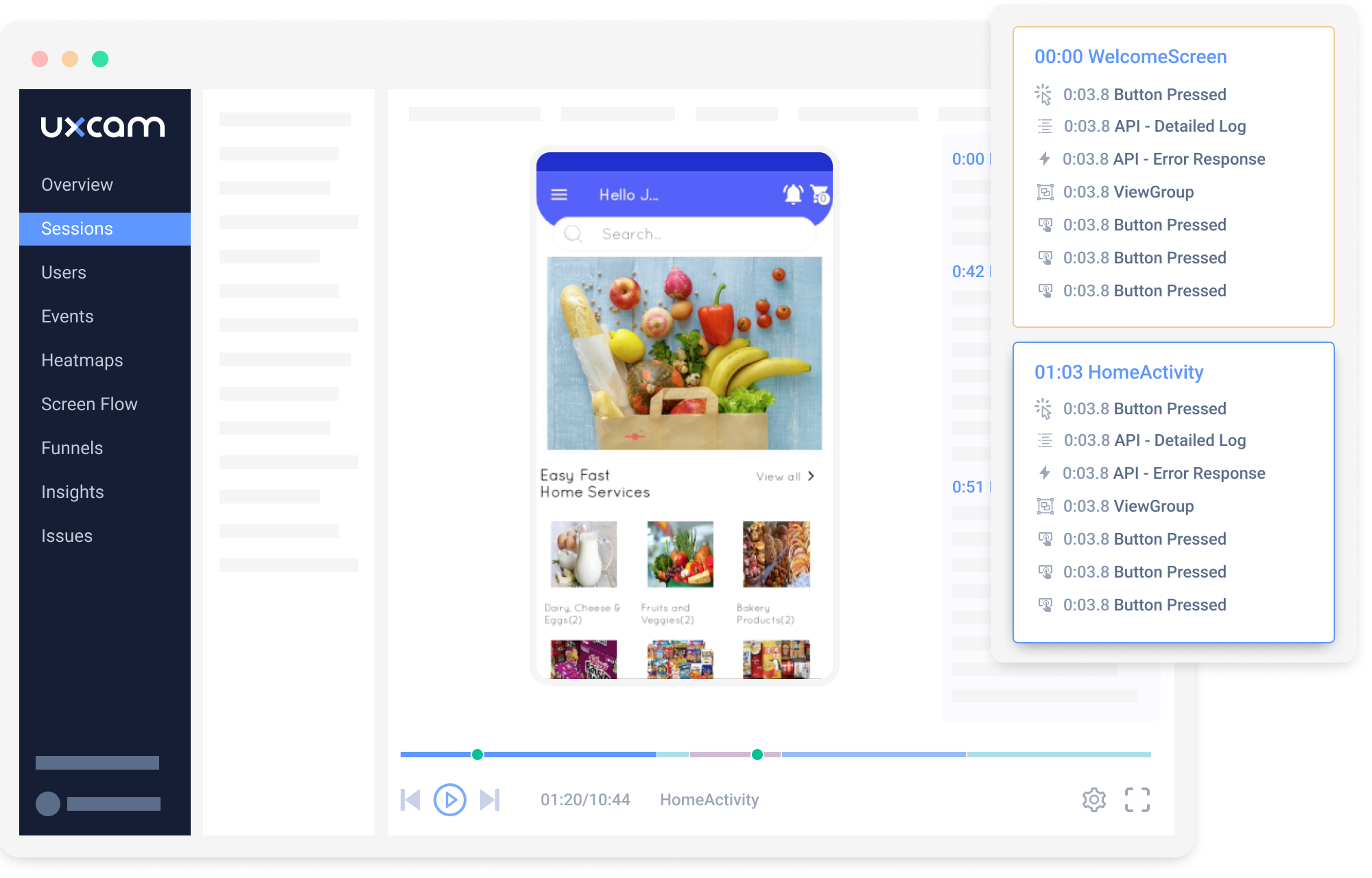
What is UXCam?
UXCam is designed specifically for mobile apps rather than websites. It combines basic product analytics with session replay and heatmap tools to help its users understand how people use their apps, and optimize conversions.
It offers SDKs for iOS (Swift and Objective C) and Android (Kotlin and Java), but also supports popular cross-platform frameworks, such as React Native and Flutter.
Key features
- Session replay: Replay videos of users using your app and analyze their behavior.
- Crash analytics: See what causes app crashes and freezes.
- Funnel analysis: See where users drop off, optimize conversion.
- Retention analysis: Detect churn patterns and improve retention.
- Heatmaps: Analyze where people interact and use gestures.
How does UXCam compare to Clarity?
Both tools support mobile, but UXCam is mobile-first while Clarity started as a web tool and added mobile later. UXCam goes significantly deeper on mobile-specific analytics and features more mature than Clarity's mobile offering.
Main differences between UXCam and Microsoft Clarity
- UXCam includes retention analysis, cohort analysis, and funnel analysis as core features. Clarity only surfaces behavioral signals like rage taps and dead taps.
- Clarity is free with no session limits. UXCam's free plan covers 3,000 sessions/month; paid plans require a sales conversation.
- UXCam includes an AI analyst that proactively watches session recordings and surfaces insights automatically. Clarity's Copilot generates summaries on demand but doesn't monitor sessions autonomously.
Main similarities between UXCam and Microsoft Clarity
- Both offer mobile session replay with touch/tap visualization.
- Both support iOS and Android natively, along with React Native and Flutter.
- Both are easy to integrate with a lightweight SDK.
- Both offer heatmaps for understanding where users interact.
Why do companies use UXCam?
According to G2 reviews, UXCam helps companies:
Identify bad UX in apps: Combining session replay with analytics data helps them understand where users get stuck and design better solutions.
Diagnose app problems UXCam enables customers to track when app crashes happen and figure out why, including information such as device type and OS version.
Improve conversion: Funnel and user path analysis helps users metrics they care about, such as purchases and user engagement.
Bottom line
UXCam is a good option if you're developing a mobile app; it offers more tools than Clarity for understanding conversion behavior and useful features for diagnosing app crashes and performance issues.
5. Lucky Orange
- Founded: 2010
- Most similar to: Hotjar
- Typical users: Marketers and consultants
- Typical customers: Small e-commerce businesses and agencies
What is Lucky Orange?
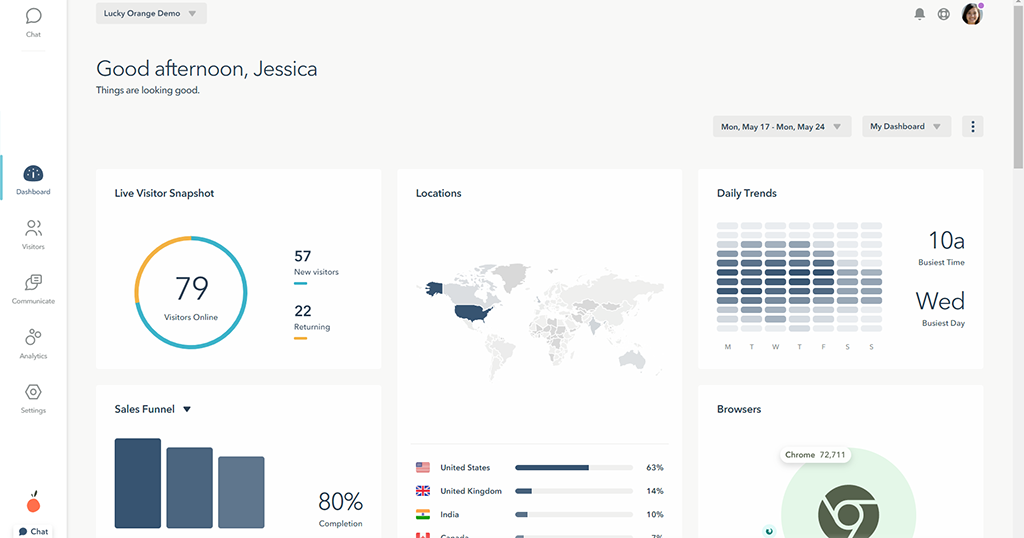
Lucky Orange is popular alternative to Hotjar – it's simple and designed to analyze user behavior on small e-commerce websites using session replays and heatmaps. It also offers a range of other useful features for store owners, such as built-in form analytics, live chat, surveys, and announcements widgets.
Key features
- Session replay: Watch how real users navigate your website.
- Heatmaps See where users click and scroll to on pages.
- Conversion funnels: Basic funnel analysis for tracking conversions.
- Dashboards: Create simple dashboards using pre-defined reports.
- Surveys and live chat: Gather feedback and engage visitors directly.
- Discovery AI: AI assistant that answers questions about visitor behavior and guides you to relevant features.
How does Lucky Orange compare to Clarity?
Lucky Orange is a simplified, focused take on Clarity. It does many of the same things, but it's designed specifically for optimizing conversion on e-commerce websites. It offers enough analytics features to make it useful for small businesses, but isn't comprehensive enough for more complicated SaaS apps.
While it doesn't offer full product analytics, it includes:
Main differences between Lucky Orange and Microsoft Clarity
- Lucky Orange adds conversion funnels, form analytics, live chat, and surveys that Clarity doesn't have, making it more useful for e-commerce optimization.
- Lucky Orange tracks session recordings and heatmaps on Shopify Plus checkout pages. Clarity supports Shopify Plus checkout tracking via Pixel but not full session replay there.
- Clarity is free with no session limits. Lucky Orange's free tier covers 100 sessions/month; paid plans start at $32/month.
Main similarities between Lucky Orange and Microsoft Clarity
- Both integrate natively with Google Analytics.
- Both support Shopify, making them popular choices for e-commerce store owners.
- Both have AI features that surface insights without manual analysis.
- Both are GDPR and CCPA compliant with automatic data masking.
Why do companies use Lucky Orange?
According to reviews on G2, because:
It's easy to use: Lucky Orange has a simple UI compared to popular analytics tools, which makes it easy for users analyze user behavior and identify issues with their websites.
It helps them improve conversion: Customers are mostly using Lucky Orange to optimize landing pages and e-commerce checkout flows, which it makes easy.
It doesn't impact page speed: Users report Lucky Orange has negligible impact on website performance, which they value highly.
Bottom line
Lucky Orange is ideal for small businesses owners who want actionable insights without much effort. It's easy to use and offers some useful benefits Clarity doesn't, such as basic conversion funnels and event tracking.
6. Hotjar
- Founded: 2014
- Most similar to: Microsoft Clarity, Lucky Orange
- Typical users: Product designers, researchers, and marketers
- Typical customers: E-commerce and content-driven sites
What is Hotjar?
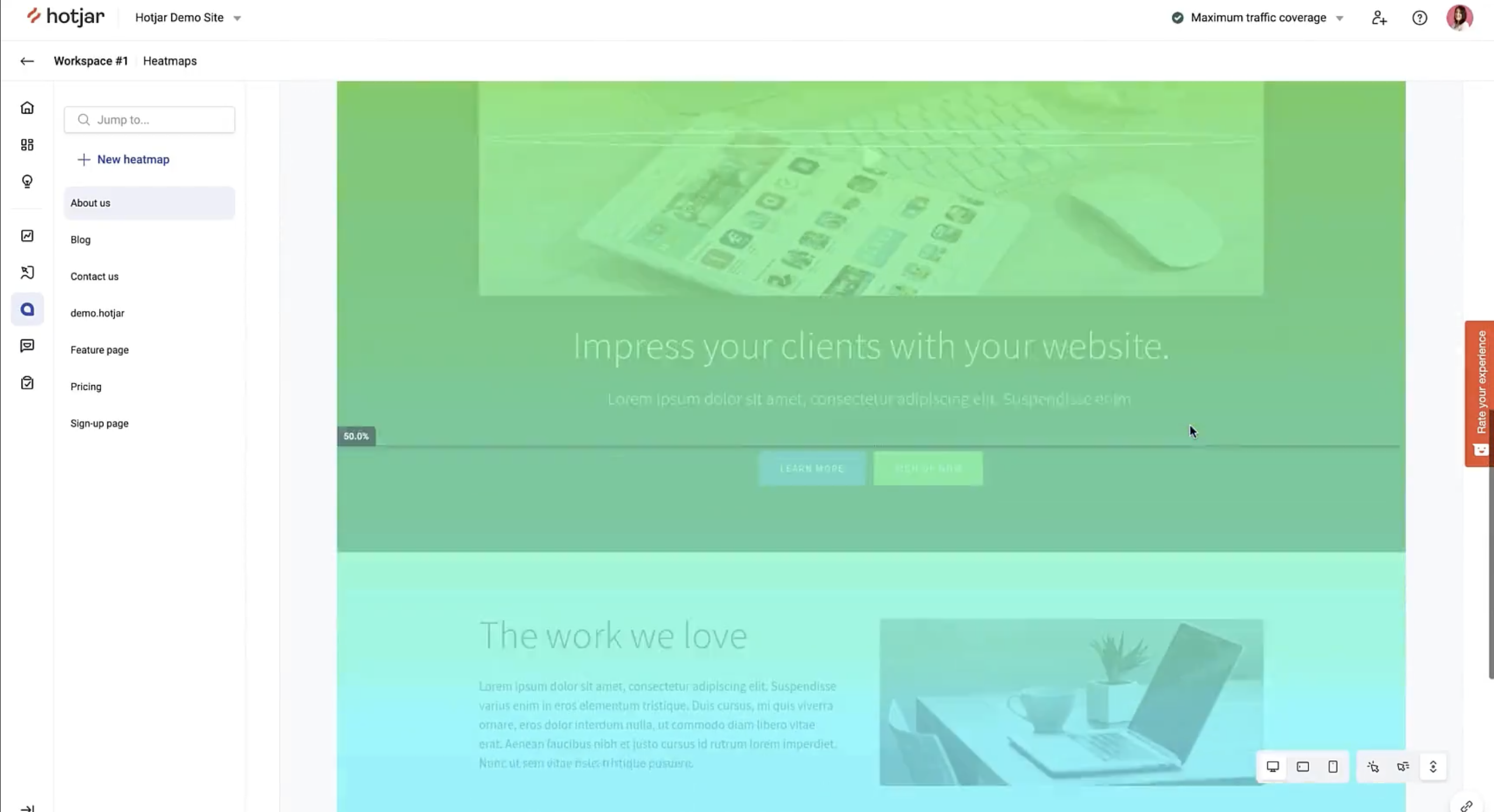
Hotjar (acquired by Contentsquare) focuses on user behavior rather than analytics. This means using heatmaps, replays, feedback, and interviews to understand the qualitative aspects of your site and app. It's popular among product designers and marketers, but not so useful for software engineers.
Key features
- Heatmaps: See what parts of your pages get attention and how far they scroll
- Recordings: Replay real user sessions and see what they see.
- Feedback: Learn what your users are thinking. Find out their likes and dislikes.
- Surveys: Gather info on user preferences using questionnaires.
- Interviews: Talk to real users to share ideas, test designs, and get live feedback.
How does Hotjar compare to Clarity?
In many ways, Hotjar is a more mature version of Clarity. It lacks the depth of analysis of PostHog or LogRocket, but it offers a few useful enhancements compared to Clarity. For example, it supports error detection. Hotjar's free plan includes basic features and allows up to 10,000 sessions per month.
Main differences between Hotjar and Microsoft Clarity
- Hotjar adds surveys, feedback widgets, and user interview recruiting (Engage) that Clarity doesn't have.
- Hotjar is now fully absorbed into Contentsquare – new users must go through the Contentsquare platform. Clarity is a standalone Microsoft product.
- Clarity is free with no session limits. Hotjar's free plan includes up to 10,000 sessions/month, with paid plans starting at $39/month.
Main similarities between Hotjar and Microsoft Clarity
- Both offer session replay, heatmaps, and scrollmaps for website behavior analysis.
- Both target non-technical users – easy to set up and interpret.
- Both support rage click detection and basic frustration signals.
- Both now have AI features: Clarity has Copilot for session insights; Hotjar/Contentsquare has AI survey generation and session summaries.
Why do companies use Hotjar?
According to G2 reviews, users are fans of Hotjar because:
Insights on user behavior: Shows what they are doing, where their attention is going, and how they are spending their time. Users love the realizations they get with Hotjar's tools.
Simple for non-technical users: Hotjar is easy to set up and use by non-technical roles like designers, marketers, and product managers. The visuals are easy to use and make data clear.
Heatmaps and scrollmaps: Seeing clicks and how far users scroll down a page works well and creates actionable insights. Helps improve UX and page designs.
Bottom line
Hotjar is a sensible option for non-technical users, though it only offers marginal upgrades on what Clarity offers for free.
7. Mouseflow
- Founded: 2009
- Most similar to: UXCam, Hotjar
- Typical users: Marketing and UX teams
- Typical customers: SMB and enterprises in retail
What is Mouseflow?
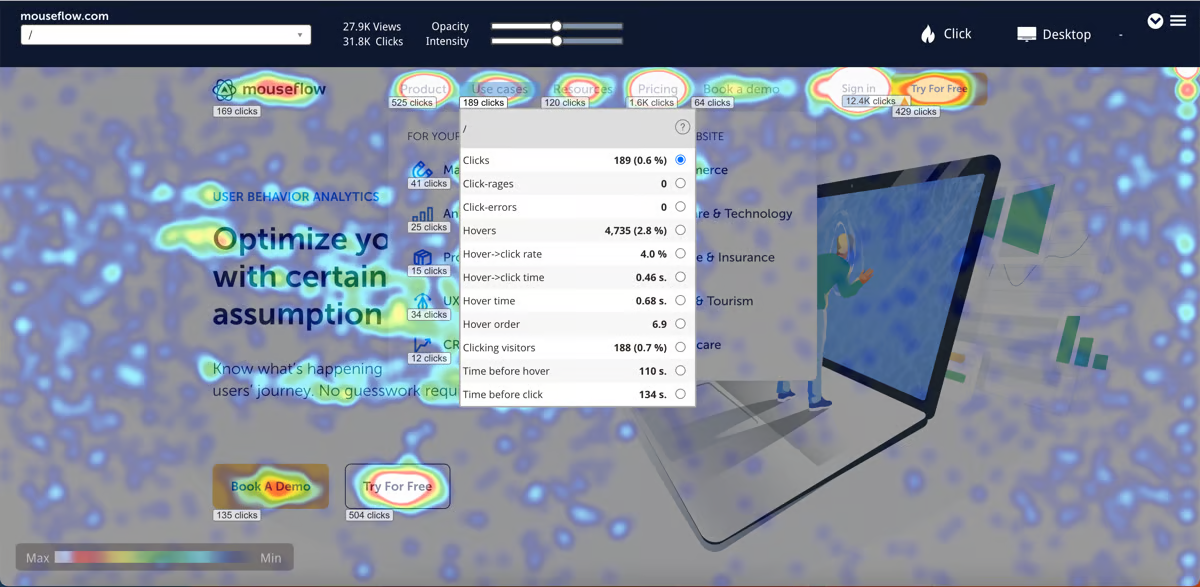
Mouseflow is a behavioral analytics tool that offers session replay, heatmap, and basic funnel analysis features. It's designed mainly for use on marketing and e-commerce websites. It also integrates with several popular A/B testing tools.
Key features
- Session replay: Watch user sessions to learn what helps and hurts.
- Friction scores: Identify sessions where users experience frustration.
- Heatmaps: See where users click and scroll on your website.
- User feedback: Gather feedback and ratings from users.
- Form analytics: Reduce abandonment on signup forms.
- Feedback campaigns: Gather in-page ratings and qualitative feedback.
How does Mouseflow compare to Clarity?
Mouseflow offers one or two features Clarity doesn't, such as funnel analysis and user feedback tools, but its replay and heatmaps features are more or less the same. Mouseflow's free plan includes 500 monthly sessions – upgrading to its Essential plan gives you 5,000 sessions for $25 a month.
Main differences between Mouseflow and Microsoft Clarity
- Mouseflow offers six automatic heatmap types – click, scroll, movement, attention, geo, and interactive. Clarity has click, scroll, area, attention, and conversion maps.
- Mouseflow includes form analytics to track field-level abandonment and completion rates. Clarity has no equivalent.
- Clarity has Copilot AI for session summaries. Mouseflow doesn't have AI-generated session insights.
- Clarity is free with no session limits. Mouseflow's free tier covers 500 sessions/month with paid plans starting at $25/month.
Main similarities between Mouseflow and Microsoft Clarity
- Both offer session replay, heatmaps, and scrollmaps for website behavior analysis.
- Both integrate with Google Analytics and Google Ads for richer context.
- Both support rage click detection and basic frustration signals.
- Both are GDPR and CCPA compliant with automatic data masking.
Why do companies use Mouseflow?
Based on reviews from G2.com, customers use Mouseflow because they:
Want to understand user behavior: Session replays and heatmaps help them see what actions users take, which areas of the website receive the most attention, and how they can improve the user experience to increase conversions.
Save time on user interviews: Using replays and surveys together enables users to gather information more efficiently compared to running user interviews.
Wanted something easy to use: Mouseflow offers basic analytical tools and autocaptures frontend events, which makes it easy for anyone to setup unearth insights.
Bottom line
Mouseflow is worth considering if you want session replay and funnel analysis in one tool, but its session replay features are very similar to Clarity's, and it doesn't support mobile apps at all.
Is PostHog right for you?
Here's the (short) sales pitch.
We're biased, obviously, but we think PostHog is the perfect Clarity replacement if:
- You value transparency (we're open source and open core)
- You want more than basic session replay and analysis tools. We offer everything in one.
- You want to try before you buy (we're self-serve with a generous free tier)
It's completely free to get started – no credit card required. Our setup wizard handles configuration in minutes, or you can check out our docs to do it yourself.
Install PostHog with one command
Paste this into your terminal and make AI do all the work.
Frequently asked questions
What does Microsoft Clarity actually do?
Microsoft Clarity is a free behavior analytics tool for websites and mobile apps. Core features include:
- Session replay: Watch recordings of real user sessions with rage click and dead click detection.
- Heatmaps: Click, scroll, and area heatmaps for any page, generated automatically.
- Copilot AI: AI-generated session takeaways and behavioral insights in natural language.
- Mobile support: SDKs for Android, iOS, React Native, Cordova/Ionic, and Flutter.
- Google Analytics integration: Connect Clarity sessions to GA4 data for additional user context.
Is Microsoft Clarity really free?
Yes. Microsoft Clarity is free with no paid tiers, and it includes unlimited session recordings, heatmaps, and Copilot AI insights.
It's free because Microsoft uses the anonymized behavioral data it collects to train and improve the machine learning models that power its own products and services.
Clarity is, in part, how Microsoft gathers that data at scale. If that trade-off gives your team pause, PostHog is open source with transparent data handling, and offers EU hosting for teams with stricter data residency requirements.
See our guide to the best open source session replay tools for more privacy-friendly options.
Does Microsoft Clarity support mobile apps?
Yes. Clarity now supports Android, iOS, React Native, Cordova/Ionic, and Flutter – so both web and mobile apps are covered. iOS support was added in 2024. The mobile SDK is free like the web version, with no session limits.
What does Microsoft Clarity not have?
Clarity has no product analytics (funnels, retention, cohorts), no feature flags, no A/B testing, no surveys or feedback tools, no error tracking, and no console log or network request capture.
It's focused primarily on behavior analysis through session replay and heatmaps.
Can PostHog replace Microsoft Clarity?
Yes, for most teams. PostHog includes session replay with rage click detection, heatmaps, and scrollmaps – the core Clarity features – plus product analytics, feature flags, experiments, error tracking, surveys, and a lot more.
The main difference is cost: Clarity is completely free with no limits, while PostHog's has a generous free tier that covers 5,000 web replays, 2,500 mobile replays, and 1 million analytics events per month.
For teams who need more than basic behavior analysis, PostHog replaces Clarity and several other tools.
What is the best free Microsoft Clarity alternative?
For pure session replay and heatmaps, Clarity itself is hard to beat – it's free with no limits.
PostHog has one of the strongest free tiers with 5,000 web and 2,500 mobile recordings free per month. Unlike many of the other tools, this includes all the features.
If you need more than just replay, PostHog's free tier includes 1 million analytics events, feature flags, error tracking, surveys, and more every month. Startups accepted into the PostHog for Startups program also get an additional $50k in credits on top of that.
If you specifically need enterprise-grade session replay, FullStory's free plan is generous – 30,000 sessions/month with 12 months of data retention, but limited features.
Which Clarity alternative is best for mobile apps?
For mobile-first teams, UXCam is the strongest option – it was built specifically for mobile with crash analytics, touch gesture heatmaps, retention analysis, and funnel analysis.
PostHog also supports mobile session replay on all plans (Android, iOS, React Native, Flutter) and connects it to product analytics and feature flags.
Clarity's own mobile SDK is free and covers the basics.
Does Hotjar still exist or is it now Contentsquare?
Hotjar was acquired by Contentsquare in 2021 and has been gradually integrated into the Contentsquare platform.
The Hotjar brand still exists and the product is still available, but pricing and some features now sit under the Contentsquare umbrella. For teams considering Hotjar, it's worth evaluating Contentsquare's broader product offering as well.
When should you consider a Microsoft Clarity alternative?
Clarity is a strong starting point, but you might want an alternative if:
- You need product analytics – Clarity has no funnels, retention, cohorts, or event tracking beyond behavior signals.
- You need debugging tools – Clarity doesn't capture console logs, network requests, or JavaScript error data.
- You need feature flags or A/B testing – Clarity has none of these.
- You need surveys or user feedback – Clarity has no qualitative feedback tools.
- You need a dedicated mobile analytics platform – Tools like UXCam go significantly deeper on mobile-specific analytics.
- You need enterprise-grade session replay – FullStory and LogRocket offer more mature replay tooling for larger teams.
For more options, see our guides to the best session replay tools, best open source session replay tools, and best mobile app session replay tools.

Subscribe to our newsletter
Product for Engineers
Read by 100,000+ founders and builders
We'll share your email with Substack
PostHog is an all-in-one developer platform for building successful products. We provide product analytics, web analytics, session replay, error tracking, feature flags, experiments, surveys, LLM analytics, logs, workflows, endpoints, data warehouse, CDP, and an AI product assistant to help debug your code, ship features faster, and keep all your usage and customer data in one stack.